Multiple files uploading with Django and valums file-uploader
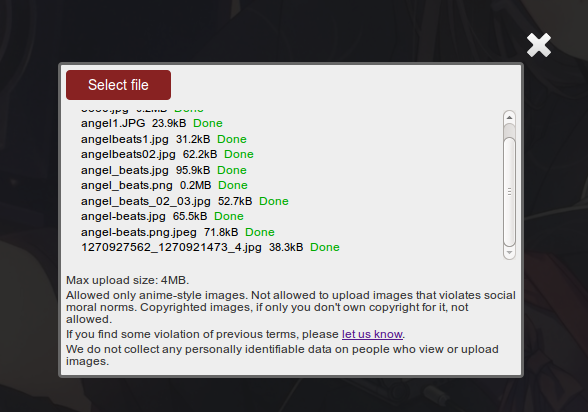
Step 1: js/html
Upload valums file-uploader:
Include fileuploader.js and fileuploader.css to your page.
Place it there You want to see uploader:
<div id="file-uploader">
    <noscript>
        <p>Please enable JavaScript to use file uploader.</p>
        <!-- or put a simple form for upload here -->
    </noscript>
</div>
Initialize file-uploader:
var uploader = new qq.FileUploader({
    element: document.getElementById('file-uploader'),
    action: '/server/upload/'
});
My configuration for uploader shown on the image:
image_uploader = new qq.FileUploader({
element: lb.find('.js-image-uploader')[0]._,
action: '/images/upload/',
allowedExtensions: ['jpg', 'jpeg', 'png', 'gif'],
sizeLimit: 4194304,
template: '<div class="qq-uploader">' +
'<div class="qq-upload-drop-area"><span>Drop files here to upload</span></div>' +
'<div class="qq-upload-button">Select file</div>' +
'<div class="qq-uploads-wrap"><ul class="qq-upload-list"></ul></div>' +
'</div>',
fileTemplate: '<li>' +
'<span class="qq-upload-file"></span>' +
'<span class="qq-upload-spinner"></span>' +
'<span class="qq-upload-size"></span>' +
'<a class="qq-upload-cancel" href="#">Cancel</a>' +
'<span class="qq-upload-result"></span>' +
'<div class="qq-progress"><span> </span></div>' +
'</li>',
onComplete: function(id, fileName, responseJson){
var el = lb.image_uploader._getItemByFileId(id);
if(responseJson.success){
$(el).find('.qq-upload-result')[0].html('<span style="color: #0a0">Done</span>');
} else {
$(el).find('.qq-upload-result')[0].html('<span style="color: #a00">Error</span>');
};
$(el).find('.qq-progress')[0].remove();
},
onProgress: function(id, fileName, loaded, total){
var el = lb.image_uploader._getItemByFileId(id);
$(el).find('.qq-progress span')[0].setStyle('width', (loaded/total*300).round() + 'px');
}
});
Step 2: Django
import os

from django.utils.simplejson import dumps
from django.http import HttpResponse, Http404
from django.core.files import locks
from django.conf import settings


def upload_image(request):
    if request.method != 'POST' or not request.is_ajax():
        raise Http404
    caption = request.GET.get('qqfile', '')
    try:
        ext = caption.split('.')[-1]
        caption = caption.split('.')[0]
    except IndexError:
        return HttpResponse(dumps({'success': False}), mimetype='application/json')
    file_name = '%s.%s' % (caption, ext)
    dir_path = os.path.join(settings.MEDIA_ROOT, 'images')
    file_path = os.path.join(dir_path, file_name)
    if os.path.exists(file_path):
        return HttpResponse(dumps({'success': False}), mimetype='application/json')
    if not os.path.exists(dir_path) or not os.path.isdir(dir_path):
        # create a directory, including missing parents, ensuring it has group write permissions
        old_mask = os.umask(0002)
        try:
            os.makedirs(dir_path)
        finally:
            os.umask(old_mask)
    write_mode = (
            os.O_WRONLY | os.O_CREAT | os.O_EXCL | getattr(os, 'O_BINARY', 0))
    fd = os.open(file_path, write_mode)
    try:
        locks.lock(fd, locks.LOCK_EX)
        while True:
            buf = request.read(512 * 1024)
            if buf:
                os.write(fd, buf)
            else:
                break
    finally:
        locks.unlock(fd)
        os.close(fd)
    return HttpResponse(dumps({'success': True}), mimetype='application/json')
Test:
import os

from django.conf import settings
from mock import Mock

from .views import upload_image


def test_upload_image(self):
        request = Mock()
        image_file = open(
            os.path.join(settings.MEDIA_ROOT, 'tests/123.jpg'), 'r')
        request.raw_post_data = image_file.read()
        request.method = 'POST'
        request.is_ajax = lambda : True
        request.GET = {'qqfile': '123.jpg'}
        file_path = os.path.join(settings.MEDIA_ROOT, 'images/123.jpg')
        if os.path.exists(file_path):
            os.remove(file_path)
        response = upload_image(request)
        self.assertTrue(os.path.exists(file_path))
Check out also these:
- https://github.com/GoodCloud/django-ajax-uploader
- http://stackoverflow.com/questions/4750168/fileupload-with-django
Step 3: Use it
File-uploader advantages:
- upload multiple files
- show progress
- cancel uploads
- restrict file extensions and max/min file sizes
- write your own validator
- use your own templates for file-uploader widget
- use your own styles for file-uploader widget
- Drag&Drop feature is enabled by default
Updates
UPD 2013-07-02
New link: http://valums-file-uploader.github.io/file-uploader.
UPD 2013-07-07
Added django code example.
UPD 2015-02-15
Fixed language.
Licensed under CC BY-SA 3.0