Django + haystack + elasticsearch simple example project
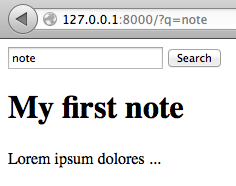
This article was entitled 'Django + haystack + whoosh simple example project' yesterday. But after I tried to use whoosh on amvhub.com, it turned out that it has a few nasty sides:
- SpellChecker class was removed from latest version of whoosh but haystack still needs it. Switching to
whoosh==2.4solves the problem. update_indexcauses adding repeating entries to SearchQuerySet. And I didn't found a way how to it. There is ticket in whoosh issues tracker: https://bitbucket.org/mchaput/whoosh/issue/97/search-index-contains-a-lot-of-duplicates.
So I decide to give a try for elasticsearch.
Here is a spike project that I created to experiment with haystack before using it in other projects: https://bitbucket.org/nanvel/hstest/.
My Note model class:
class Note(models.Model):
    title = models.CharField(max_length=1000)
    body = models.TextField()
    timestamp = models.DateTimeField(auto_now=True)

    def __unicode__(self):
        return self.title
Next I put few steps that lead to search feature implementation.
1. Requirements
pip install django-haystack==2.0.0
pip install pyelasticsearch==0.5
Install elasticsearch on OS X:
brew install elasticsearch
# and launch:
elasticsearch -f -D es.config=/usr/local/Cellar/elasticsearch/0.90.2/config/elasticsearch.yml
Install elasticsearch on Ubuntu 12.04:
sudo apt-get update
sudo apt-get install openjdk-7-jre-headless -y
wget https://download.elasticsearch.org/elasticsearch/elasticsearch/elasticsearch-0.90.0.deb
sudo dpkg -i elasticsearch-0.90.0.deb
2. Update django settings
INSTALLED_APPS = (
    'django.contrib.auth',
    'django.contrib.contenttypes',
    'django.contrib.sessions',
    'django.contrib.sites',
    'django.contrib.messages',
    'django.contrib.staticfiles',
    'django.contrib.admin',

    'south',
    'haystack',

    'hstest.apps.notes',
)

HAYSTACK_CONNECTIONS = {
    'default': {
        'ENGINE': 'haystack.backends.elasticsearch_backend.ElasticsearchSearchEngine',
        'URL': 'http://127.0.0.1:9200/',
        'INDEX_NAME': 'haystack',
    },
}

HAYSTACK_SIGNAL_PROCESSOR = 'haystack.signals.RealtimeSignalProcessor'
The last line will enable signal processor that for every change in the models will run update_index: https://django-haystack.readthedocs.org/en/latest/signal_processors.html#realtime-realtimesignalprocessor.
3. Create search_indexes.py
from django.utils import timezone
from haystack import indexes

from .models import Note


class NoteIndex(indexes.SearchIndex, indexes.Indexable):
    text = indexes.CharField(document=True, use_template=True)
    title = indexes.CharField(model_attr='title')
    body = indexes.CharField(model_attr='body')

    def get_model(self):
        return Note

    def index_queryset(self, using=None):
        """Used when the entire index for model is updated."""
        return self.get_model().objects.filter(timestamp__lte=timezone.now())
This was a little bit confusing for me. The text field here is the most important. All You want to be available for search should be here. I want to search by Note.title and Note.body. To add them to the text field, I need to edit notes_text.txt. Let's create it.
{# templates/search/indexes/notes/note_text.txt #}
{{ object.title }}
{{ object.body }}
Then why we need the rest of fields? They will be present in search results. If the title field will be missing here, results[n].title will cause an exception.
4. Use haystack forms or views
http://django-haystack.readthedocs.org/en/latest/views_and_forms.html
I think that forms is more flexible, so this example will use SearchForm.
This form accepts query from request.GET['q'].
SearchForm returns no results if query was not specified, this behavior is not satisfied me, so I overrided the form:
# forms.py
from haystack.forms import SearchForm


class NotesSearchForm(SearchForm):

    def no_query_found(self):
        return self.searchqueryset.all()
# views.py
from django.shortcuts import render_to_response

from .forms import NotesSearchForm


def notes(request):
    form = NotesSearchForm(request.GET)
    notes = form.search()
    return render_to_response('notes.html', {'notes': notes})
5. Add the form to search page template
{% extends 'base.html' %}

{% block content %}
<form type="get" action=".">
    <input type="text" name="q">
    <button type="submit">Search</button>
</form>

{% for note in notes %}
<h1>{{ note.title }}</h1>
<p>
    {{ note.body }}
</p>
{% endfor %}
{% endblock %}
6. Before using search we need to create index
python manage.py rebuild_index
After every data update should be launched:
python manage.py update_index
But it is not necessary if we use RealtimeSignalProcessor.
Links:
UPD 2014-07-13
Elasticsearch has a flaw in its default configuration
Add
script.disable_dynamic: true
to /etc/elasticsearch/elasticsearch.yml
UPD 2016-03-26
Elsticsearch has a beautiful http rest api. I don't see any benefits in using haystack, just talk to elasticsearch directly using your favourite http client. Read Elasticsearch: The Definitive Guide first.
Licensed under CC BY-SA 3.0